
Reviewed · SEOUL
South Korea eSIM (3-30 days. Up to 45GB)
The best thing about this Seoul eSIM is how little time it asks of you. You buy it before departure, scan a QR code from your email, and can be online within minutes instead of hunting for a SIM counter after a long flight. It is made for mobile data, not a tour, meetup, or physical pickup.
I like the choice of 3 to 30 day plans, which keeps you from paying for a full month on a short visit. I also like the useful fallback: once your high-speed allowance is gone, data continues at 3G speed. The main caution is phone compatibility, and the description also contains a confusing reference to coverage in Canadian provinces, so confirm the South Korea plan and your device before paying.
In This Review
- Key points
- Staying connected from the moment you land
- What the 3 to 30 day options mean
- Installing the QR code before your trip
- Turning on data roaming after arrival
- 4G and 5G for maps, messages, and calls
- Coverage beyond Seoul
- The real value at about five dollars
- Who will find this useful
- What the five ratings tell you, and what they do not
- Cancellation and booking details
- Should you buy this South Korea eSIM?
- FAQ
- Where does this eSIM work?
- How long can I use the eSIM?
- How much high-speed data is available?
- Does the eSIM provide 4G or 5G?
- How do I receive the eSIM?
- Do I need to meet anyone or collect a SIM card?
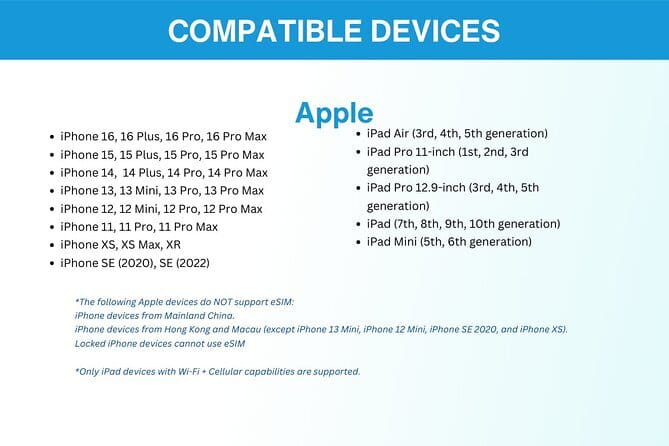
- Which phones support this eSIM?
- What should I do if the eSIM does not connect after landing?
Key points
- Up to 45GB of high-speed data: The package gives you a substantial allowance for maps, messages, translation, and ordinary trip planning.
- Three to 30 days: Choose a duration that matches your stay instead of buying a fixed-length SIM.
- QR-code delivery by email: There is no airport collection, meeting point, or physical card to lose.
- 4G and 5G where available: Your connection uses local mobile networks, with 3G continuing after the high-speed limit.
- Activation needs care: You must own an eSIM-compatible phone and may need data roaming turned on after landing.
- Remote support only: Help is available by email, not at a shop or airport desk.
Staying connected from the moment you land
A phone connection is not a luxury in Seoul. You may use it to find your hotel, check a subway route, translate a sign, message someone at home, or call up a reservation. This eSIM is designed to cover those everyday needs without asking you to replace your regular SIM card.
The setup happens before or during your trip. After ordering, you receive the eSIM by email, usually as a QR code. You scan that code with your compatible phone, add the eSIM profile, and connect to mobile data. The stated setup time is only a few minutes, though your actual experience depends on your phone and how familiar you are with its settings.
This is a purely digital product. You do not meet a guide, collect anything in Seoul, or visit a service desk. The listed start and end point is Seoul, but that is an administrative location rather than a physical appointment.
Other Seoul trips people book alongside this one:
- Best DMZ Tour Korea from Seoul (Red Suspension Bridge Optional)
★ 5.0 · 41,422 reviews - DMZ Tour: 3rd Tunnel, Option(Suspension Bridge, Boat) from Seoul
★ 5.0 · 21,373 reviews - DMZ tour south Korea from Seoul (NK experience hall, defector)
★ 5.0 · 20,599 reviews
What the 3 to 30 day options mean
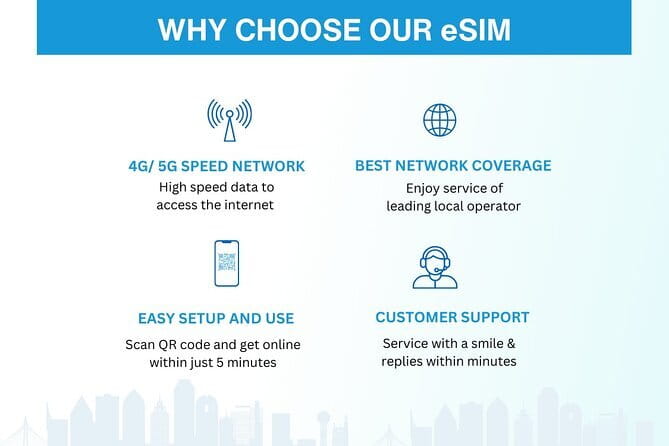
The plan length is one of the strongest parts of this purchase. You can select a package lasting from 3 days to 30 days, which fits a weekend stop, a weeklong holiday, or a longer South Korea visit.
That flexibility matters because mobile data packages often become poor value when the duration does not match your plans. A three-day visitor should not need to pay for 30 days, while someone staying nearly a month may prefer one purchase rather than topping up several times.
The available plans go as high as 45GB of high-speed data. That is enough to give you room for maps, messaging, online searches, translation tools, social media, and some video use, although the exact amount depends on the plan you select. The information provided does not list every price and data combination, so read the option carefully before checkout.
After you use the high-speed allowance, the connection switches to 3G. That is an important safety net, but it is not the same as full-speed service. Basic messages and light browsing may still work, while video, large downloads, and image-heavy pages can become slow.
Installing the QR code before your trip
The smoothest approach is to install the profile while you still have dependable Wi-Fi. You receive the QR code by email, then use your phone’s eSIM settings to scan it. The exact menu names vary by brand, but the phone must support eSIM technology.
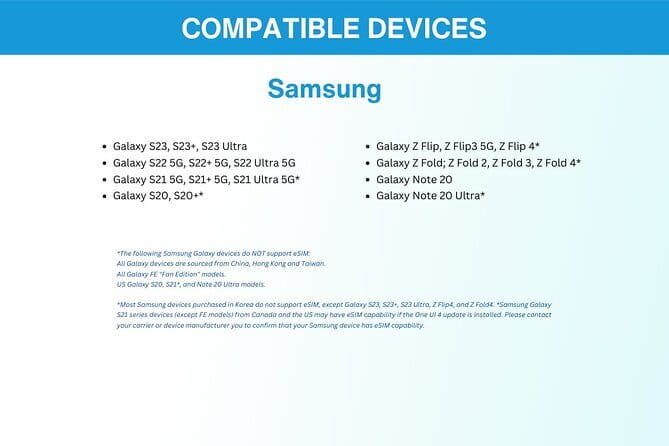
The listed examples include iPhone XS and newer models, Google Pixel 3 and newer models, and Samsung S20, S21, and Fold models. Those examples are helpful, but they are not a substitute for checking your exact phone. A phone can be new enough in general and still lack eSIM support because of its model, region, or carrier restrictions.
You should also check that the phone is unlocked for use with another mobile network. The supplied information specifically stresses eSIM compatibility, but an unlocked phone is a practical condition for most international mobile plans. If you are unsure, contact Xplori before ordering rather than discovering the problem at the airport.
Installing the eSIM does not necessarily mean you must use it immediately. You can add the profile before departure and keep your normal line in place until you arrive. Follow the activation instructions sent with the QR code, since the exact steps and timing can vary.
Turning on data roaming after arrival
One useful operating tip is easy to overlook: after landing, you may need to turn on data roaming for the eSIM. A user report also noted that restarting the phone helped complete activation.
That means your arrival checklist should be simple:
- Select the new eSIM as the line used for mobile data.
- Turn on data roaming for that eSIM if the instructions require it.
- Restart the phone if the connection does not appear.
- Keep your home line’s data roaming off if you want to avoid accidental charges from your regular provider.
The product includes remote customer service by email. That is useful if the QR code fails, the profile does not activate, or you need help with the settings. It is not instant counter service, so I would install the eSIM in advance and allow time to solve problems before boarding.
A completely different kind of day, same trip:
- DMZ Insider Tour: 3rd Tunnel, NK Defector Meet & Red Bridge
★ 4.9 · 15,214 reviews - Seoul: DMZ Tour with Optional Suspension Bridge
★ 4.8 · 5,277 reviews - Signature DMZ Tour: Exclusive Defector Talk & Suspension Bridge
★ 5.0 · 4,459 reviews - Thrilling Korean DMZ 3rd Tunnel Tour from Seoul + Red Bridge Rush
★ 5.0 · 3,097 reviews
4G and 5G for maps, messages, and calls
The plan offers 4G and 5G data where available. The phrase where available matters. It does not promise a 5G signal at every address, and your phone, local conditions, and network coverage all affect the result.
For normal city use, the practical benefit is clear. You can keep a map open while finding a café, check a subway route, send messages, and search for opening hours without looking for Wi-Fi. One report described reliable service during a stay and another noted that video calls and streaming worked well. Those are encouraging signs, but your speed can still vary by location and network conditions.
The connection is data-only as described. There is no mention of a local phone number, voice minutes, or SMS service. Plan to use internet-based messaging and calling services if you need to contact people. Your usual phone number may still work through your regular SIM, but the costs and settings for that line come from your home provider, not this eSIM.
The high-speed limit is the main technical boundary. Streaming video and frequent video calls can use data quickly. If you want to preserve the allowance, use Wi-Fi for large downloads and check whether your phone is backing up photos or updating apps over mobile data.
Coverage beyond Seoul

The experience is sold for a South Korea trip, so it is not limited to a Seoul-only itinerary in the description. A direct user report described connection from Seoul to Jeju Island, which is useful if your plans extend beyond the capital.
Still, no detailed network map or named Korean carrier is provided. You are told that the eSIM connects to the best local network automatically, but the specific network is not identified. That automatic selection may save you from manual settings, while the lack of a named carrier means you cannot compare its coverage in advance with a particular Korean provider.
The description also says that the data plan covers all Canadian provinces. That does not fit a South Korea eSIM and appears to be a description error or copied text. I would not treat that sentence as proof of Canadian coverage. Before buying, confirm that the plan you select is intended for South Korea and ask Xplori about the destination if the wording remains unchanged.
The real value at about five dollars
At a listed price of $5 per person, this is inexpensive compared with the time and hassle of buying a physical SIM at an airport. The saving is not only the price of the card. You also avoid standing in line, explaining your needs across a language barrier, and dealing with a tiny plastic SIM that can vanish into your passport wallet.
The value depends on the package you choose. A short plan with a modest data allowance could be a smart fit for a brief Seoul stop. A longer plan with up to 45GB is more useful if you will rely on your phone all day or visit several parts of the country.
You should compare the final price of each duration and data amount rather than assuming every option costs five dollars. The advertised starting price may apply to one particular plan. The supplied details give the headline price but do not provide a complete table of durations and allowances.
There is also value in keeping your regular SIM installed. You do not need to remove it, and you avoid the risk of losing it. The tradeoff is that dual-SIM settings can be confusing, so check which line handles data before using the phone heavily.
Who will find this useful
I would choose this eSIM if you want a quick data connection and prefer to prepare before takeoff. It suits first-time visitors who do not want to deal with a Korean airport counter, as well as repeat visitors who already know that maps and translation tools are central to their days.
It is also a good match for:
- Short stays of 3 to 7 days.
- Longer trips needing up to 30 days of service.
- People who use messaging apps instead of local voice calls.
- Visitors moving between Seoul and Jeju Island.
- Anyone who wants to avoid a physical SIM card.
- Phone users comfortable with scanning a QR code and changing mobile settings.
I would be more cautious if you need a local phone number, constant high-speed streaming, or face-to-face technical help. The product details do not promise voice service, unlimited high-speed data, or in-person support.
What the five ratings tell you, and what they do not
The experience has a perfect overall rating from five reviews, with praise focused on three practical points: reliable connection, good customer service, and easy setup. One report specifically said the eSIM automatically found the best local network and worked from Seoul to Jeju Island. Another said internet service did not cause problems during the stay.
There are also two useful setup notes. Turn on data roaming after arrival, and restart the phone if activation does not finish properly. Those small steps can save you from thinking the eSIM is faulty when the issue is simply a setting.
The sample is small, so I would treat the rating as encouraging rather than conclusive. It does not provide a full technical test of every phone model, every part of South Korea, or every plan size. The strongest case for buying is the low price and simple digital delivery, not a promise of perfect speed in every place.
Cancellation and booking details
You receive confirmation at the time of booking, and free cancellation is available if you cancel at least 24 hours before the experience start time. Changes made inside that 24-hour window are not accepted, and cancellations during that period are not refunded. The cut-off follows Seoul local time.
Since the product arrives by email, check your inbox and spam folder after purchase. You should also keep the QR code available until installation is complete. There is no pickup or meetup, and the service ends as a digital data plan rather than at a physical location.
Should you buy this South Korea eSIM?
I would book it if you have a compatible, unlocked phone and want inexpensive data without an airport SIM purchase. The low starting price, flexible 3 to 30 day duration, up to 45GB of high-speed data, and continued 3G access make it a sensible basic connection for Seoul and trips farther afield.
Before paying, confirm three things: your phone supports eSIM, the selected option covers the number of days and data you need, and Xplori confirms that the confusing Canada wording does not affect the South Korea plan. Install it on Wi-Fi, turn on data roaming after landing, and restart the phone if necessary.
Skip it if you need a local phone number, unlimited high-speed data, or on-site help. For most people who mainly need maps, messages, translation, and ordinary browsing, this is a practical way to stay connected at a modest cost.
FAQ
Where does this eSIM work?
It is offered for a trip to South Korea, with Seoul named as the location. A user report also described service from Seoul to Jeju Island. Detailed network coverage information is not provided.
How long can I use the eSIM?
You can choose a plan lasting from 3 to 30 days.
How much high-speed data is available?
The options provide up to 45GB of high-speed data. After the stated high-speed allowance is used, the connection switches to 3G speed.
Does the eSIM provide 4G or 5G?
It provides 4G and 5G data where available. Actual speed depends on availability and your compatible phone.
How do I receive the eSIM?
The eSIM is delivered digitally by email after booking. You scan the supplied QR code to install the eSIM profile.
Do I need to meet anyone or collect a SIM card?
No. This is a digital product with no pickup, meetup, or physical SIM card. Remote customer service is available by email.
Which phones support this eSIM?
Examples listed include iPhone XS and newer, Google Pixel 3 and newer, and Samsung S20, S21, and Fold models. You should confirm your exact phone supports eSIM before ordering.
What should I do if the eSIM does not connect after landing?
Turn on data roaming for the eSIM as directed, and restart your phone if needed. If you still need help, contact the provider by email.
Just added around Seoul
- Jeonju & Yeosu: 4-Day Foodie & Artist Journey★ 5.0 · 3 reviews
- Seongsu-dong Walking Tour: K-Pop, Culture, Cheer, Friends & Relax★ 4.5 · 3 reviews
- Full Day Private Seoul Tour for foodies★ 5.0 · 3 reviews
- Imjingak DMZ Private Tour for Incheon Airport and Cruise Guests★ 5.0 · 3 reviews
- K-Pop Tour★ 3.5 · 3 reviews
- Seoul: LEGOLAND Admission with Transport (Optional Railbike)★ 5.0 · 3 reviews
- Seoul: Seorak Mountain, East DMZ, and Sokcho Tour★ 5.0 · 3 reviews
- Strawberry Picking, Winter Sled with Eobi Ice Valley from Seoul★ 4.5 · 3 reviews